My home server setup in 2026
I started building my home server about 2 years ago. Before that, I had tried pretty much every data management tool and workflow out there.
In the 2000s, I only had a phone and no personal computer. Life was simple back then. The only thing I needed to worry about was backups. I just bought a couple of extra microSD cards for my good old Nokia and periodically backed up my data using internet café PCs tucked away in the dark streets of Baku.
Once I got a PC, things were still fairly simple. I only had to do a three-way sync between my PC, my phone, and an external hard drive. Even 10-15 years ago, I was a data-syncing freak. I made sure all my music and photos existed on all my devices and were also backed up separately.
At some point, my valuable files no longer fit on both my PC and phone at the same time. Enter the cloud. My first choice was Dropbox’s free tier. This was around the time Dropbox suddenly appeared out of nowhere and every tech enthusiast was using it. It was great to store all your files somewhere out in the wild and access them from both my Android phone and PC. I didn’t even need to keep everything on my PC. Just pick what you wanted locally and leave the rest in the eternal cloud of someone else’s computer.
Over the years, I migrated between Google Photos/Drive, Microsoft OneDrive, and back to Dropbox every few years, depending on pricing and my family situation. Once I married a woman who uses Apple devices, things like family plans and macOS integration entered the equation. That made me jump from service to service until I found one that satisfied most of our requirements at that time. There was never one that satisfied everything.
I can’t say my home server is the best cloud out there, but it ended up being the best option for a few reasons:
- I no longer care which service has the best sync app for phones and PCs. I’m flexible enough to spin up yet another Docker service if there’s a syncing or backup workflow we don’t already have. More on this later.
- As a toy operating system, iOS will never fully integrate with any workflows other than iCloud (and even that’s questionable). I’m flexible here too, I can throw random solutions at the problem without being locked into a cloud provider.
- I don’t think anything is truly private anymore, but I can at least feel a bit better knowing there’s a lower chance of someone accessing my family’s data. Some will argue that self-hosted solutions are less secure than big corporations, but more on that later too.
- And the last reason is simply fun and proving that I can do it. This is one of those things that helps me fight impostor syndrome from time to time: “I might be a terrible software engineer, a terrible husband, a terrible friend; but you should see my amazing home server!”
Hardware
I started with just one ARM-based system, but now I actually run two home servers: an Orange Pi 5 Plus and an Intel N100-based custom build. Each has its own purpose.
Orange Pi 5 Plus
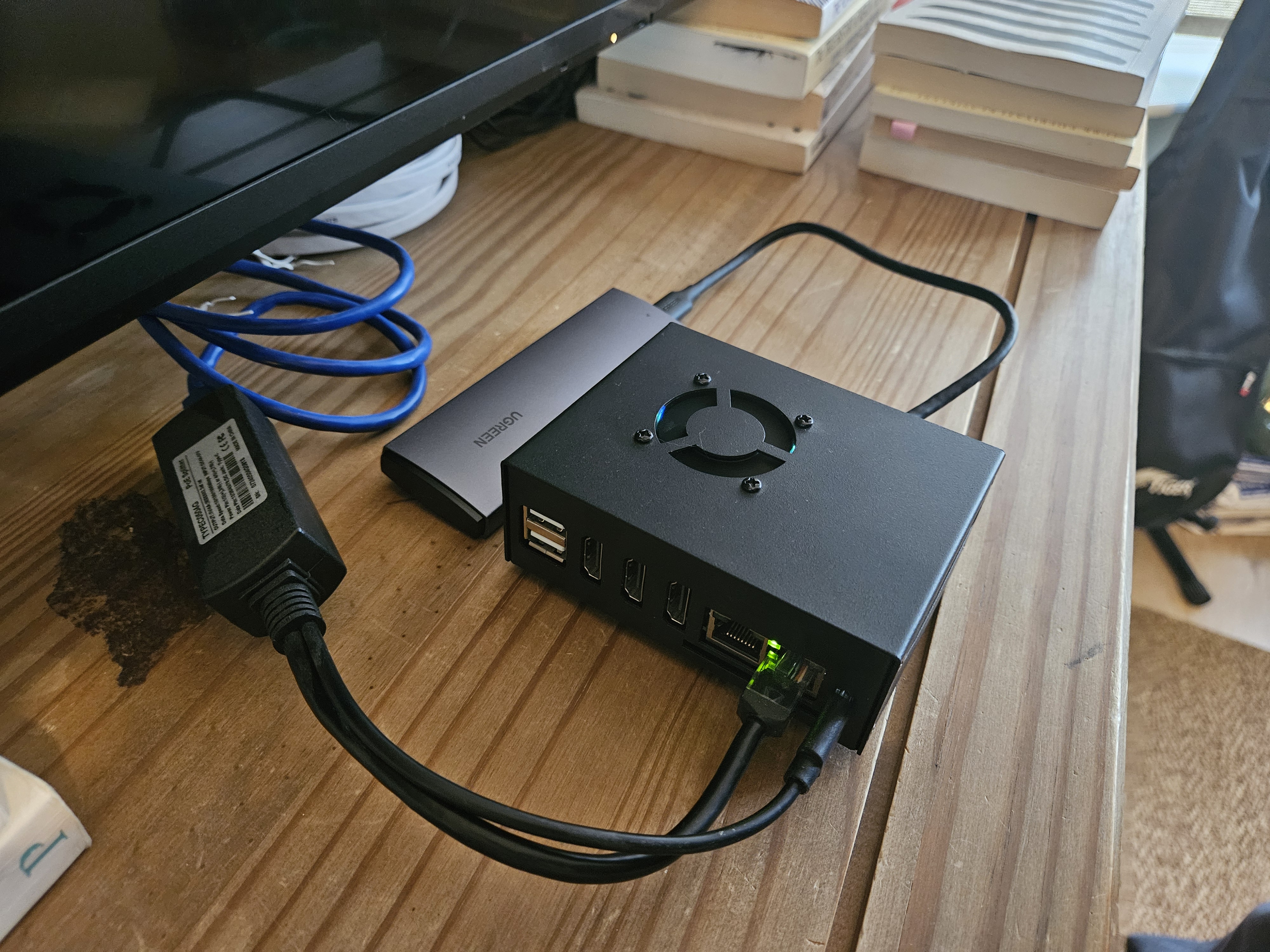
This machine has a Rockchip RK3588 8-core ARM CPU, 16 GB of RAM, and a 2 TB NVMe SSD. I’ve admired ARM-based systems ever since my first day at the University of Manchester, where every Computer Science student was given a first-edition Raspberry Pi. The idea that such a tiny thing could run a full Linux OS was wild at the time. Later, I realized my Android phone was essentially the same thing, just crippled by the industry in the name of security.
This was my first home server because I wanted something I could hide behind my TV under the router, while still being able to store files and run services. It did a good job, but I eventually outgrew it. Today, it runs Home Assistant and Frigate. It’s essentially an NVR, recording my doorbell and garden cameras 24/7, while also making my thermostat smarter through Home Assistant schedules.
By design, the only backup for this system is S3 Glacier on Scaleway. There are no local backups, and if things go wrong, I don’t really plan to recover anything from Glacier. It’s mostly just camera footage. I keep the backup only in case something unexpectedly turns out to be worth recovering.
And this is intentional. The system is very write-heavy, which means the SSD’s lifespan will be relatively short. By separating it from my main system and accepting that the SSD is effectively disposable, I only store things here that I’m OK with losing.
Intel N100
For a long time, my work laptop was very open and could be personalised. I was lucky to work for a UK company that trusted its engineers to decide what software to run and how to use their devices. I even stopped using my personal laptop altogether and gave it to my mom, once I realized that all I really needed was a headless home server and a phone. For everything else, my work laptop was enough. That “everything else” was basically just a separate Firefox browser with my personal profile.
Of course, all good things must end. My company introduced Netskope along with a bunch of strict policies about what services I could and couldn’t use. That included locking the laptop to Chrome only and even disallowing SMB network shares. When I discussed this with the security team, I was essentially told that I wasn’t supposed to use one of the world’s most powerful and efficient laptops for anything other than work.
I hated the idea of buying a personal laptop that I’d maybe use for 20 minutes a day. What is this, are we back in 2010? I thought laptops would fit into our pockets by now. I even tried using Samsung DeX as a personal device for a while, but yeah, it’s just not convenient. Maybe a Galaxy Z Tri-Fold with DeX will be enough for me someday.
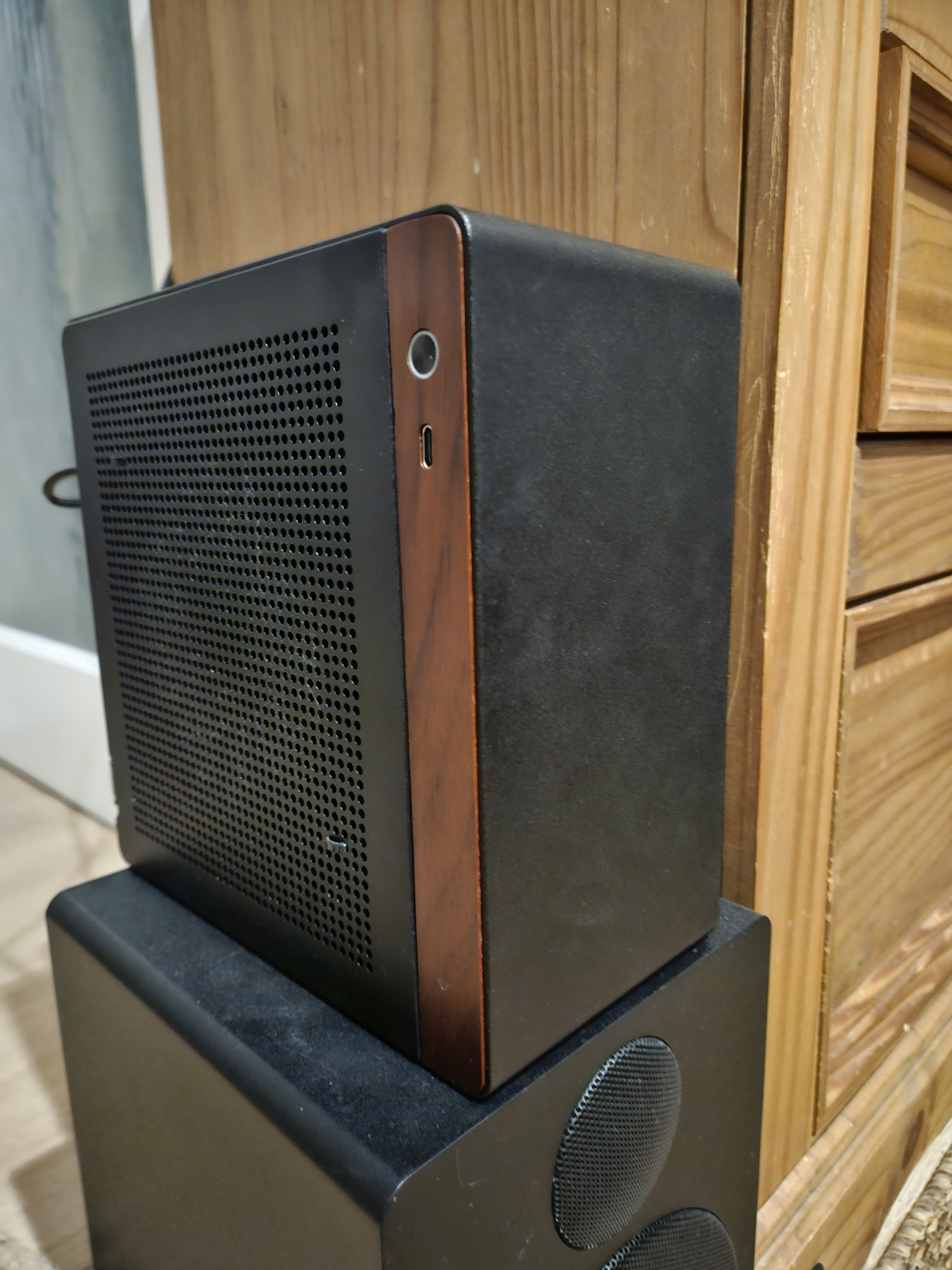
After weeks of thinking and Googling, I decided to either go with AMD’s Strix Halo platform or an Intel N100 as a home server, and then just connect to it remotely whenever I wanted a desktop experience. I still think Strix Halo would be the better choice, but it’s insanely expensive, and I couldn’t find an upgradable version. Most options had soldered memory and poor storage expansion.
So I went with an Asus PRIME Intel N100I-D D4 motherboard, a Jonsbo N10 case, and a SilverStone FX350-G 350W 80+ Gold PSU (I previously had a Seasonic PSU, but it died in less than three months). The Intel N100 isn’t great. It’s just cheap and efficient and does most things OK. I paired it with 32 GB of single-channel DDR4 Lexar memory and a 4 TB NVMe SSD initially, but later switched to two 4 TB Western Digital Blue SSDs in a ZFS mirror mode.
All our family files, photos, and services run on this server. Everything is slow, but I can remotely connect to my Arch Linux install and write this article, so that’s good enough. This system is also backed up to Scaleway S3 Glacier.
4 TB NVMe SSD in an external USB 3 enclosure
This is connected externally to the Intel machine as an extra layer of local backup, just in case both SSDs in the ZFS pool fail. I use Restic here to get versioned backups so I can roll back if needed.
Networking
I use the Zyxel EX5601-T1 router provided by my ISP, with 150 Mbps up/down fiber. It’s paired with a cheap TP-Link 5-port switch, four of which provide Power over Ethernet for my cameras and the Orange Pi 5 Plus. Yes, the Orange Pi runs entirely on PoE using a USB-C splitter. Fewer cables.
Software
I’ve suffered a lot. Years of switching between Windows, macOS, Linux distributions, Android apps, office suites, and browser wars. I don’t want to install and configure yet another piece of software just to replace it a few months later because the company changed its privacy policy or added a questionable, unremovable AI feature.
What I want is the simplest system, a suite of applications that just works quietly for years. At the same time, I want the flexibility to customize things when I feel like it.
For me, that basically means open source. If I stick to open source, I can have workflows that remain untouched and stable for years and only receive gradual upgrades. That doesn’t mean open source can’t go rogue, it absolutely can. But almost always, someone can fork it and bring things back to how they were. Here’s what I run on my servers.
Orange Pi 5 Plus Software
Armbian worked well on this device, but I had to switch to Joshua Riek’s Ubuntu due to a weird SSD compatibility issue. As mentioned earlier, this device is essentially a smart-home hub and NVR.
-
Joshua Riek’s Ubuntu 24.04 LTS installed on a 2 TB NVMe SSD (I’ll probably need to switch back to Armbian with the next Ubuntu LTS, since it looks like Joshua Riek is no longer maintaining this build)
-
Docker containers:
- Home Assistant
- Frigate
- Portainer
- Rclone (for backups to Scaleway S3)
- dockurr/samba
Yes, I even use Docker just to expose the server as an SMB share. The reason is simple: I don’t want to write a single custom Linux config file or install software directly on the host. Everything lives in Docker Compose files stored on Git repo. If I ever move to a new machine, I just git checkout the repo and run docker compose up -d.
Intel N100 Software
This server runs Arch Linux. I’m not a Linux expert, but I managed to install it using archinstall. I also run GNOME as a GUI because I connect to this machine remotely and use it as a desktop PC. Isn’t GNOME slow and not very performant? Correct, but I’m tired of configuring even my desktop. I just want something that works. I don’t even want to install separate remote desktop software; GNOME ships with one, and it’s good enough.
-
Arch Linux with GNOME installed on a 256 GB M.2 SSD
-
Docker containers running on a ZFS mirror (2 × 4 TB SSDs):
- Cloudflare DDNS - I don’t have a static IP, so I use the Cloudflare API to periodically update a DNS record for one of my subdomains. This lets me connect home from the outside world.
- WireGuard Easy - This is my VPN setup. My router only exposes the TCP and UDP ports WireGuard needs. All my devices—and my wife’s—connect through it. Adding a new device is trivial: create a client in the UI and scan a QR code. I don’t expose any other services to the internet, because I don’t trust the authentication layers of most self-hosted apps. Anyone can slap a username/password screen on an app; securing it properly is another story.
- Backrest - Scheduled Restic backups to the external USB drive
- Rclone - Backups to Scaleway S3
- dockurr/samba
- Syncthing - The pinnacle of engineering. I sync folders across my server, our phones, PCs, and even Android TV. Everything then gets backed up to the ZFS pool, the USB drive, and Scaleway S3.
- Portainer
- Linkwarden
- Immich - Ok, this is the pinnacle of engineering. At this point, I think Immich is more feature-complete than any other photo backup service out there. I’m managing an 800+ GB photo and video library for my family on this service.
- Tandoor